| Description | Here are some of the limitations of the Mini HD AV2VGA Video Converter:It does not support VGA to AV conversion.
It may not work with all devices.
The image quality may not be as good as with a native VGA signal.
Overall, the Mini HD AV2VGA Video Converter is a great way to connect older AV devices to a modern VGA monitor or TV. It is easy to use and affordable, and it supports resolutions up to 1080p. However, it is important to note that it does not support VGA to AV conversion, and the image quality may not be as good as with a native VGA signal. | Here are some of the benefits of using the SanDisk Extreme Portable SSD:Fast transfer speeds
Durable construction
Wide compatibility
Long warranty
Here are some of the drawbacks of the SanDisk Extreme Portable SSD: | Here are some of the features of the Lapcare LPC388A Toner Cartridge:Compatible with HP LaserJet printers
Yields up to 1700 pages
1-year warranty
Here are some of the benefits of using the Lapcare LPC388A Toner Cartridge: | Here are some of the features of the Logitech H111:Standard 3.5mm audio jack
Compatible with most devices
Adjustable headband
Soft foam ear cups
Rotatable microphone
Clear sound quality
Comfortable fit | Here are some of the key features of a USB 2.0 High Speed Printer Cable Scanner Cable A Male to B Male for HP, Canon, Etc. GREY:Supports speeds of up to 480 Mbps
Backward compatible with USB 1.1 and USB 1.0 devices
Shielded to protect against interference
Easy to use
Compatible with a wide range of printers and scanners
Here are some of the benefits of using a USB 2.0 High Speed Printer Cable Scanner Cable A Male to B Male for HP, Canon, Etc. GREY: | Here are some of the features of the GOBBLER GB-4388-MG:Counting speed of 1000 notes per minute
Counts all old and new notes
Fake note detection
Heavy-duty construction
1 year warranty
The GOBBLER GB-4388-MG is a great choice for any business or office that needs a reliable and efficient note counting machine. It is fast, accurate, and easy to use. The machine also comes with a variety of features that make it a great value for the price. |
| Content |
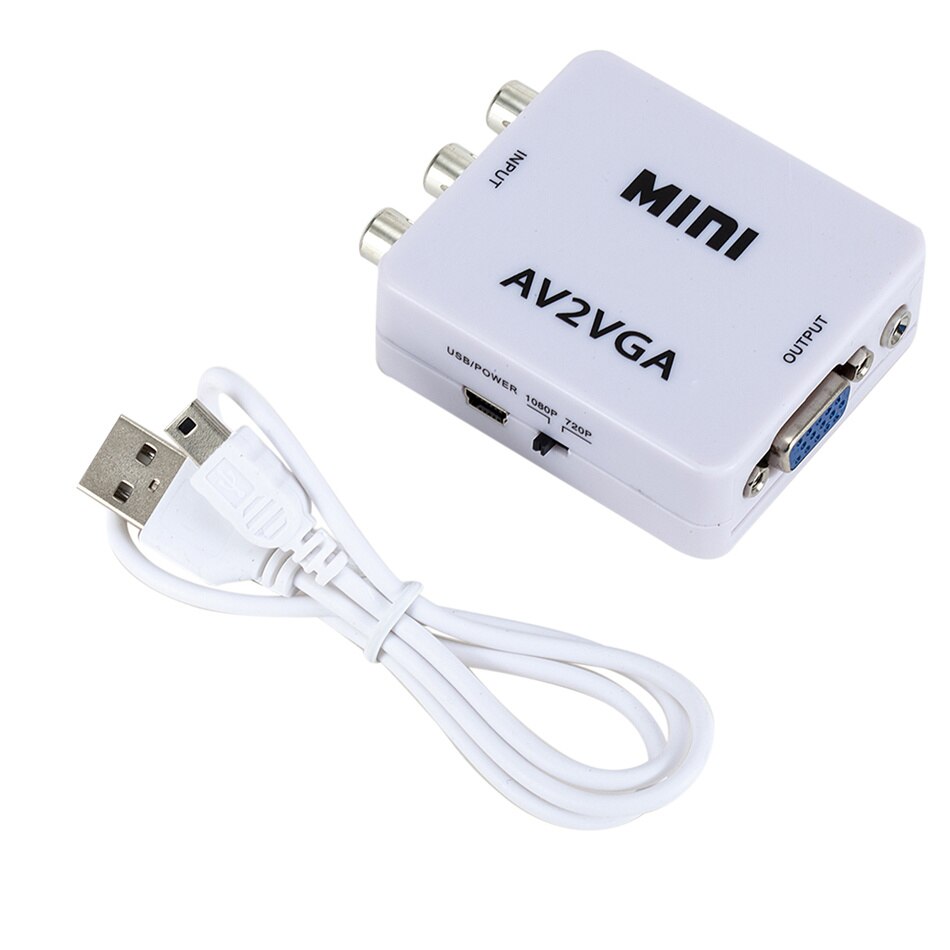
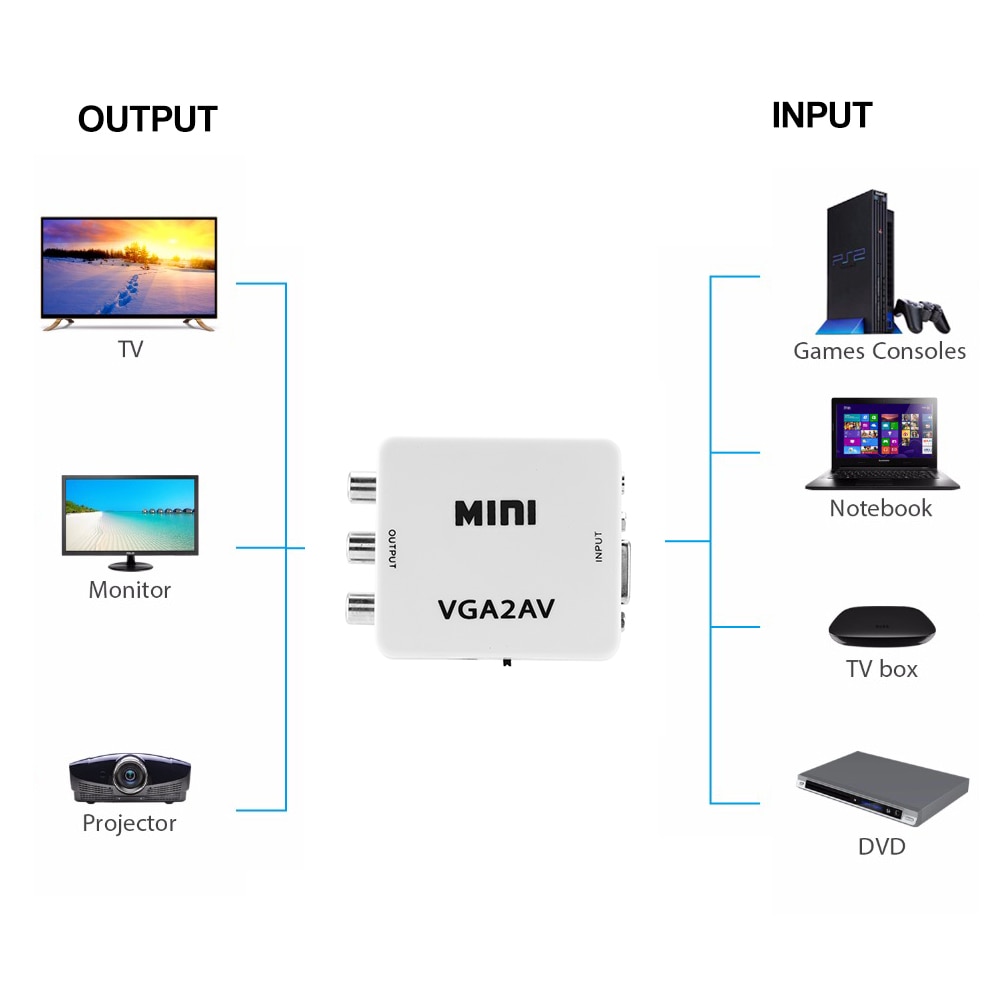
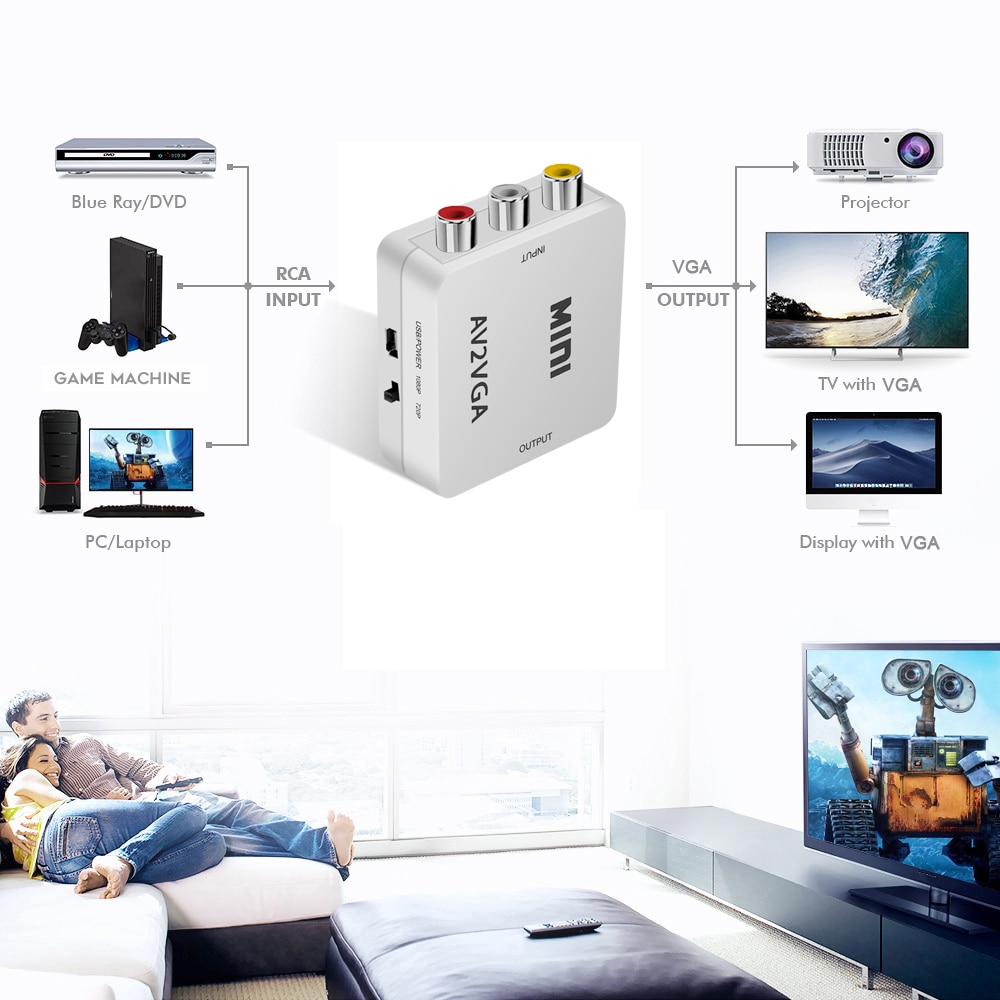
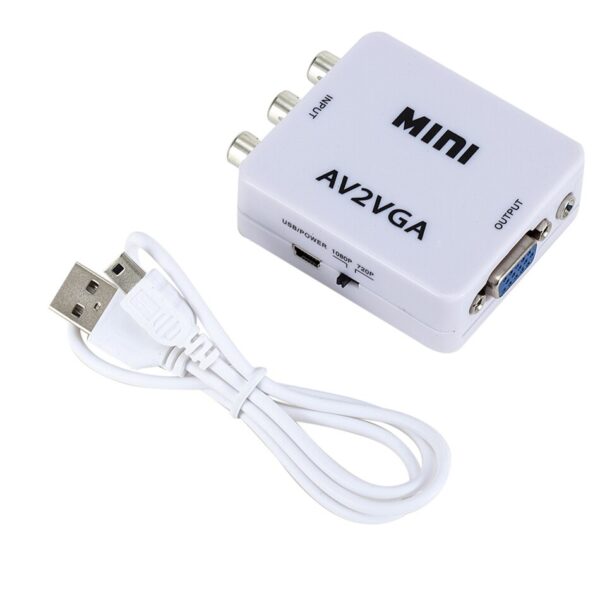
The Mini HD AV2VGA Video Converter is a small, portable device that allows you to convert AV (composite) signals to VGA. This means that you can connect devices that output AV signals, such as old game consoles, VCRs, and DVD players, to a modern VGA monitor or TV. The converter is plug-and-play, so you don't need to install any drivers. It also supports resolutions up to 1080p, so you can enjoy high-quality video output.Here are some of the features of the Mini HD AV2VGA Video Converter:Converts AV (composite) signals to VGA
Supports resolutions up to 1080p
Plug-and-play, no drivers required
Small and portable
Affordable
Here are some of the limitations of the Mini HD AV2VGA Video Converter:It does not support VGA to AV conversion.
It may not work with all devices.
The image quality may not be as good as with a native VGA signal.
Overall, the Mini HD AV2VGA Video Converter is a great way to connect older AV devices to a modern VGA monitor or TV. It is easy to use and affordable, and it supports resolutions up to 1080p. However, it is important to note that it does not support VGA to AV conversion, and the image quality may not be as good as with a native VGA signal.Here are some additional details about the converter:It has a yellow RCA video input, two RCA audio inputs, and a 3.5mm stereo audio output.
It is powered by a USB cable.
It measures approximately 2.5 x 1.5 x 0.5 inches.
I hope this helps!Here are some of the limitations of the Mini HD AV2VGA Video Converter:It does not support VGA to AV conversion.
It may not work with all devices.
The image quality may not be as good as with a native VGA signal.
Overall, the Mini HD AV2VGA Video Converter is a great way to connect older AV devices to a modern VGA monitor or TV. It is easy to use and affordable, and it supports resolutions up to 1080p. However, it is important to note that it does not support VGA to AV conversion, and the image quality may not be as good as with a native VGA signal. | The SanDisk Extreme Portable SSD is a high-performance external solid-state drive (SSD) that is designed for professionals and enthusiasts who need fast and reliable storage. It offers read speeds of up to 1050 MB/s and write speeds of up to 1000 MB/s, making it ideal for transferring large files quickly. The Extreme Portable SSD is also built to be tough, with a durable aluminum enclosure that can withstand drops of up to 2 meters and is water- and dust-resistant. It is also compatible with a wide range of devices, including PCs, Macs, and smartphones.Here are some of the features of the SanDisk Extreme Portable SSD:Up to 1050 MB/s read speeds
Up to 1000 MB/s write speeds
Durable aluminum enclosure
Water- and dust-resistant (IP55)
Compatible with PCs, Macs, and smartphones
5-year warranty
Here are some of the benefits of using the SanDisk Extreme Portable SSD:Fast transfer speeds
Durable construction
Wide compatibility
Long warranty
Here are some of the drawbacks of the SanDisk Extreme Portable SSD:Can be expensive
Not as portable as some other SSDs
Overall, the SanDisk Extreme Portable SSD is a great option for professionals and enthusiasts who need a fast, reliable, and durable external SSD. It offers excellent performance, a durable construction, and a wide compatibility, making it a great choice for a variety of uses.Here are some additional details about the SanDisk Extreme Portable SSD:The Extreme Portable SSD is powered by a USB Type-C connector, which allows it to be used with a wide range of devices.
The Extreme Portable SSD is also equipped with a built-in security feature that allows you to encrypt your data using a password. | The Lapcare LPC388A Toner Cartridge is a compatible replacement for the HP 88A toner cartridge. It is designed to work with HP LaserJet printers, including the P1002, P1003, P1005, P1006, P1009, P1007, P1008, M1136, M1213nf, M1216, and M1218. The cartridge yields up to 1700 pages, and it is backed by a 1-year warranty.Here are some of the features of the Lapcare LPC388A Toner Cartridge:Compatible with HP LaserJet printers
Yields up to 1700 pages
1-year warranty
Here are some of the benefits of using the Lapcare LPC388A Toner Cartridge:Affordable
High-quality
Easy to install
Backed by a warranty
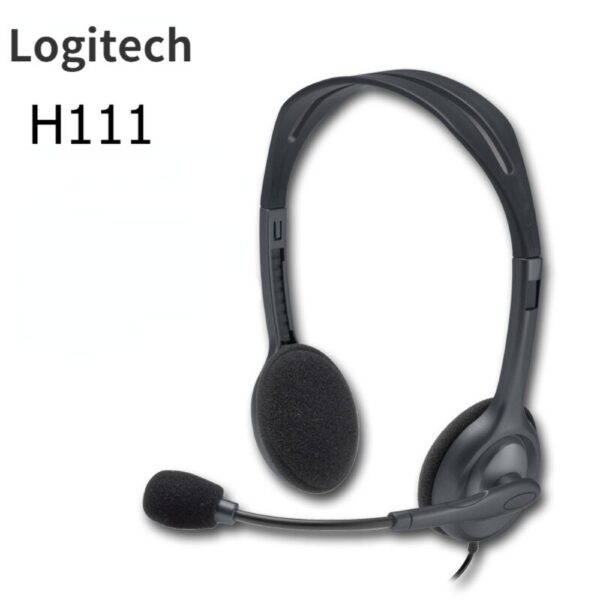
If you are looking for a compatible replacement for the HP 88A toner cartridge, the Lapcare LPC388A Toner Cartridge is a great option. It is affordable, high-quality, and easy to install. | The Logitech H111 is a wired on-ear headset with a microphone. It is a simple and affordable headset that is perfect for making calls, listening to music, or watching videos. The headset has a standard 3.5mm audio jack and is compatible with most devices, including computers, smartphones, and tablets.The H111 has a sturdy yet lightweight design. The headband is adjustable to fit most head sizes, and the ear cups are made of soft foam for a comfortable fit. The microphone is located on the left ear cup and can be rotated to the right side if desired.The H111 produces clear sound with good bass response. The microphone is also clear and picks up sound well. The headset is comfortable to wear for long periods of time.Overall, the Logitech H111 is a great value for the price. It is a simple and affordable headset that delivers good sound quality and a comfortable fit.Here are some of the features of the Logitech H111:Standard 3.5mm audio jack
Compatible with most devices
Adjustable headband
Soft foam ear cups
Rotatable microphone
Clear sound quality
Comfortable fit
Here are some of the benefits of using the Logitech H111:Affordable
Easy to use
Comfortable to wear
Good sound quality
Clear microphone
Here are some of the drawbacks of the Logitech H111:Not noise-canceling
Not wireless
Not high-end sound quality
Overall, the Logitech H111 is a great value for the price. It is a simple and affordable headset that delivers good sound quality and a comfortable fit. If you are looking for a basic headset for making calls, listening to music, or watching videos, the Logitech H111 is a great option. | A USB 2.0 High Speed Printer Cable Scanner Cable A Male to B Male for HP, Canon, Etc. GREY is a type of cable that is used to connect printers and scanners to computers. It is a high-speed cable that can transfer data at speeds of up to 480 Mbps. The cable is also backward compatible with USB 1.1 and USB 1.0 devices.The cable is made of high-quality materials and is designed to last. It is also shielded to protect against interference. The cable is easy to use and can be plugged in and unplugged without any difficulty.The cable is compatible with a wide range of printers and scanners. It is also compatible with a variety of computers, including Windows, Mac, and Linux computers.The cable is a great way to connect your printer or scanner to your computer. It is a high-quality cable that is easy to use and compatible with a wide range of devices.Here are some of the key features of a USB 2.0 High Speed Printer Cable Scanner Cable A Male to B Male for HP, Canon, Etc. GREY:Supports speeds of up to 480 Mbps
Backward compatible with USB 1.1 and USB 1.0 devices
Shielded to protect against interference
Easy to use
Compatible with a wide range of printers and scanners
Here are some of the benefits of using a USB 2.0 High Speed Printer Cable Scanner Cable A Male to B Male for HP, Canon, Etc. GREY:Fast speeds: The cable supports speeds of up to 480 Mbps, which allows you to transfer data quickly and easily.
Backward compatibility: The cable is backward compatible with USB 1.1 and USB 1.0 devices, so you can use it with older devices.
Shielding: The cable is shielded to protect against interference, which can help to improve the quality of your data transfer.
Easy to use: The cable is easy to use and can be plugged in and unplugged without any difficulty.
Compatibility: The cable is compatible with a wide range of printers and scanners, so you can use it with most devices.
If you are looking for a high-quality cable to connect your printer or scanner to your computer, a USB 2.0 High Speed Printer Cable Scanner Cable A Male to B Male for HP, Canon, Etc. GREY is a great option. It is a fast, backward compatible, shielded, easy to use, and compatible cable that is perfect for most users. | The GOBBLER GB-4388-MG is a business-grade note counting machine that is perfect for any business or office. It has a counting speed of 1000 notes per minute, and it can count all old and new notes. The machine also has fake note detection, which makes it impossible to miss any fake notes. The GOBBLER GB-4388-MG is a heavy-duty counter that is built to last. It is made of high-quality materials and it is designed to withstand the rigors of everyday use. The machine also comes with a 1 year warranty, so you can be sure that you are getting a quality product.Here are some of the features of the GOBBLER GB-4388-MG:Counting speed of 1000 notes per minute
Counts all old and new notes
Fake note detection
Heavy-duty construction
1 year warranty
The GOBBLER GB-4388-MG is a great choice for any business or office that needs a reliable and efficient note counting machine. It is fast, accurate, and easy to use. The machine also comes with a variety of features that make it a great value for the price.Here are some of the benefits of using the GOBBLER GB-4388-MG:Save time and money by counting notes quickly and accurately
Protect your business from counterfeit notes
Increase efficiency and productivity by automating the note counting process
Reduce the risk of human error
Enjoy peace of mind knowing that your notes are counted accurately and securely
If you are looking for a reliable and efficient note counting machine, the GOBBLER GB-4388-MG is a great option. It is fast, accurate, and easy to use. The machine also comes with a variety of features that make it a great value for the price. |










Reviews
There are no reviews yet.