| Description | Here are some of the features of the Logitech H111:Standard 3.5mm audio jack
Compatible with most devices
Adjustable headband
Soft foam ear cups
Rotatable microphone
Clear sound quality
Comfortable fit | Here are some of the key features of the TP-Link UE300C:Supports speeds of up to 1000Mbps
Plug and play
USB Type-C connector
Foldable and portable design
2-year warranty
Here are some of the benefits of using the TP-Link UE300C: | The adapter is compatible with a variety of devices, including:iPhone
Samsung S20 ultra/S21/S10/S8/S9
MacBook Pro
iPad
To use the adapter, simply plug the Mini USB cable into the adapter and then plug the adapter into the USB Type C port.The adapter is a great way to connect your older devices to new devices that have USB Type C ports. It is also a great way to avoid having to buy new cables for all of your devices. | Here are some of the features of the Lapcare LPC388A Toner Cartridge:Compatible with HP LaserJet printers
Yields up to 1700 pages
1-year warranty
Here are some of the benefits of using the Lapcare LPC388A Toner Cartridge: | Here are some of the benefits of using a USB 3.0 hub:You can connect more devices to your computer.
You can transfer files faster.
You can use your devices more efficiently.
You can save space on your desk.
If you need to connect more devices to your computer, a USB 3.0 hub is a great solution. | Here are some of the key features of the TP-Link LS1008:8 Gigabit Ethernet ports
Auto MDI/MDIX
Energy-efficient technology
Plug and play
The TP-Link LS1008 is a great choice for anyone looking to expand their wired network. It is easy to use and reliable, and it offers a variety of features that make it a great value for the price. |
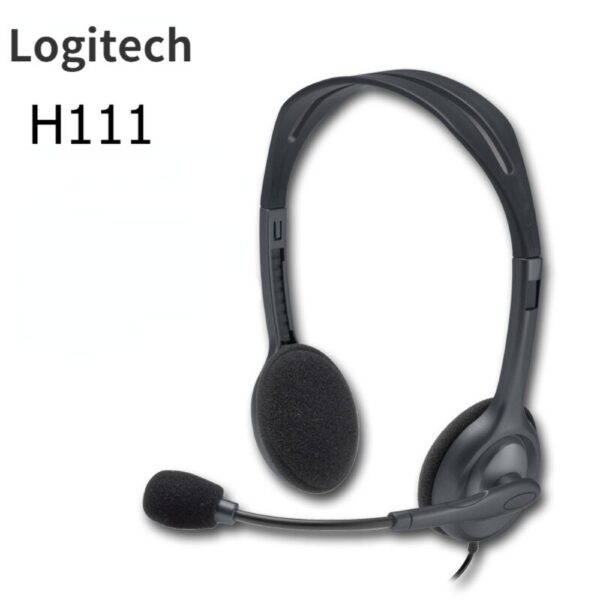
| Content | The Logitech H111 is a wired on-ear headset with a microphone. It is a simple and affordable headset that is perfect for making calls, listening to music, or watching videos. The headset has a standard 3.5mm audio jack and is compatible with most devices, including computers, smartphones, and tablets.The H111 has a sturdy yet lightweight design. The headband is adjustable to fit most head sizes, and the ear cups are made of soft foam for a comfortable fit. The microphone is located on the left ear cup and can be rotated to the right side if desired.The H111 produces clear sound with good bass response. The microphone is also clear and picks up sound well. The headset is comfortable to wear for long periods of time.Overall, the Logitech H111 is a great value for the price. It is a simple and affordable headset that delivers good sound quality and a comfortable fit.Here are some of the features of the Logitech H111:Standard 3.5mm audio jack
Compatible with most devices
Adjustable headband
Soft foam ear cups
Rotatable microphone
Clear sound quality
Comfortable fit
Here are some of the benefits of using the Logitech H111:Affordable
Easy to use
Comfortable to wear
Good sound quality
Clear microphone
Here are some of the drawbacks of the Logitech H111:Not noise-canceling
Not wireless
Not high-end sound quality
Overall, the Logitech H111 is a great value for the price. It is a simple and affordable headset that delivers good sound quality and a comfortable fit. If you are looking for a basic headset for making calls, listening to music, or watching videos, the Logitech H111 is a great option. | The TP-Link UE300C USB Type-C to RJ45 Gigabit Ethernet Network Adapter is a small, portable adapter that allows you to connect your USB Type-C devices to a wired network. It supports speeds of up to 1000Mbps, making it ideal for streaming HD video, gaming, and transferring large files.The UE300C is easy to use. Simply plug it into your USB Type-C port and connect an Ethernet cable to the other end. The adapter will automatically be detected by your computer and you will be able to connect to the internet.The UE300C is a great option for anyone who wants to add wired connectivity to their USB Type-C devices. It is small, portable, and easy to use. It is also backed by a 2-year warranty.Here are some of the key features of the TP-Link UE300C:Supports speeds of up to 1000Mbps
Plug and play
USB Type-C connector
Foldable and portable design
2-year warranty
Here are some of the benefits of using the TP-Link UE300C:Fast speeds: The UE300C supports speeds of up to 1000Mbps, making it ideal for streaming HD video, gaming, and transferring large files.
Easy to use: The UE300C is easy to use. Simply plug it into your USB Type-C port and connect an Ethernet cable to the other end. The adapter will automatically be detected by your computer and you will be able to connect to the internet.
Portable: The UE300C is small and portable, so you can easily take it with you wherever you go.
Durable: The UE300C is backed by a 2-year warranty.
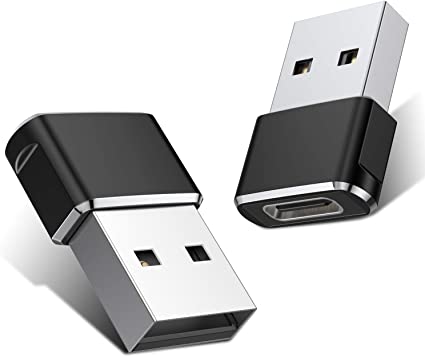
If you are looking for a way to add wired connectivity to your USB Type-C devices, the TP-Link UE300C is a great option. It is small, portable, easy to use | A Mini USB C Type C Adapter Plug, Type C Female to USB A Male Charger Charging Cable Adapter Converter is a device that allows you to connect a Mini USB device to a USB Type C port. This can be useful if you have a new device that only has a USB Type C port, but you still have older devices that use Mini USB cables.The adapter is small and lightweight, making it easy to carry with you. It is also made of durable materials, so it can withstand the wear and tear of everyday use.The adapter is compatible with a variety of devices, including:iPhone
Samsung S20 ultra/S21/S10/S8/S9
MacBook Pro
iPad
To use the adapter, simply plug the Mini USB cable into the adapter and then plug the adapter into the USB Type C port.The adapter is a great way to connect your older devices to new devices that have USB Type C ports. It is also a great way to avoid having to buy new cables for all of your devices.Here are some of the benefits of using a Mini USB C Type C Adapter Plug, Type C Female to USB A Male Charger Charging Cable Adapter Converter:Allows you to connect Mini USB devices to USB Type C ports
Small and lightweight
Made of durable materials
Compatible with a variety of devices
Affordable
If you have a Mini USB device and a new device that only has a USB Type C port, then a Mini USB C Type C Adapter Plug, Type C Female to USB A Male Charger Charging Cable Adapter Converter is a great way to connect the two devices. | The Lapcare LPC388A Toner Cartridge is a compatible replacement for the HP 88A toner cartridge. It is designed to work with HP LaserJet printers, including the P1002, P1003, P1005, P1006, P1009, P1007, P1008, M1136, M1213nf, M1216, and M1218. The cartridge yields up to 1700 pages, and it is backed by a 1-year warranty.Here are some of the features of the Lapcare LPC388A Toner Cartridge:Compatible with HP LaserJet printers
Yields up to 1700 pages
1-year warranty
Here are some of the benefits of using the Lapcare LPC388A Toner Cartridge:Affordable
High-quality
Easy to install
Backed by a warranty
If you are looking for a compatible replacement for the HP 88A toner cartridge, the Lapcare LPC388A Toner Cartridge is a great option. It is affordable, high-quality, and easy to install. | The 4 Port USB HUB SuperSpeed 3.0 High-Speed Multiport Slim USB Hub 1 feet Cable Length Adapter and Led Indicator Compatible for Pendrive, Mouse, Keyboards, Mobile, Tablet ( Black ) 08 is a USB 3.0 hub that allows you to connect up to four USB devices to your computer. It has a sleek and slim design that makes it easy to take with you on the go, and it comes with a built-in LED indicator that shows which ports are in use. The hub is compatible with a wide range of devices, including external hard drives, printers, scanners, and more. It also supports data transfer speeds of up to 5Gbps, which means you can transfer large files quickly and easily.Here are some of the key features of the 4 Port USB HUB SuperSpeed 3.0 High-Speed Multiport Slim USB Hub 1 feet Cable Length Adapter and Led Indicator Compatible for Pendrive, Mouse, Keyboards, Mobile, Tablet ( Black ) 08:Supports up to four USB devices
Slim and portable design
Built-in LED indicator
Compatible with a wide range of devices
Data transfer speeds of up to 5Gbps
If you're looking for a high-speed USB 3.0 hub that is easy to use and compatible with a wide range of devices, the 4 Port USB HUB SuperSpeed 3.0 High-Speed Multiport Slim USB Hub 1 feet Cable Length Adapter and Led Indicator Compatible for Pendrive, Mouse, Keyboards, Mobile, Tablet ( Black ) 08 is a great option.Here are some of the benefits of using a USB 3.0 hub:You can connect more devices to your computer.
You can transfer files faster.
You can use your devices more efficiently.
You can save space on your desk.
If you need to connect more devices to your computer, a USB 3.0 hub is a great solution. |
1
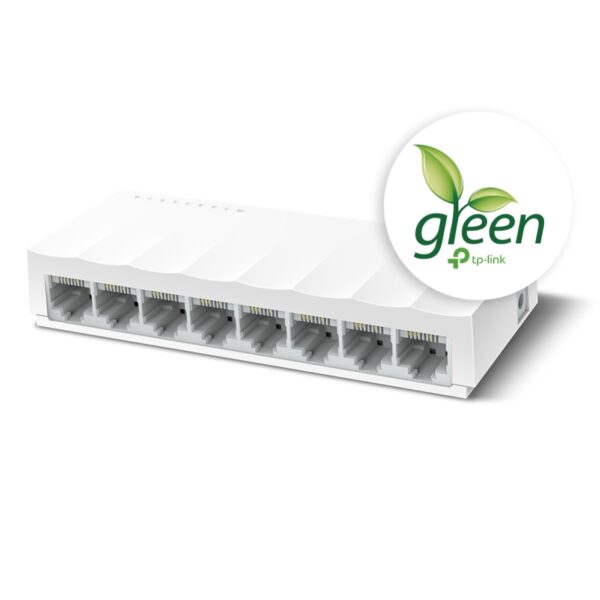
The TP-Link LS1008 is an 8-port 10/100Mbps desktop switch that offers an easy and affordable way to expand your wired network. It is easy to use and reliable, and with all ports supporting Auto-MDI/MDIX, there's no need to worry about the type of cable to use. The LiteWave Series also supports energy-efficient technology, helping you save power and money.Here are some of the key features of the TP-Link LS1008:8 Gigabit Ethernet ports
Auto MDI/MDIX
Energy-efficient technology
Plug and play
The TP-Link LS1008 is a great choice for anyone looking to expand their wired network. It is easy to use and reliable, and it offers a variety of features that make it a great value for the price.Here are some of the benefits of using the TP-Link LS1008:Easy to use: The LS1008 is a plug-and-play device, so there's no need to configure anything. Just connect your devices to the ports and you're good to go.
Reliable: The LS1008 is a reliable device that has been designed to withstand the rigors of everyday use. It is also backed by a 2-year warranty.
Affordable: The LS1008 is an affordable device that offers great value for the price.
If you are looking to expand your wired network, the TP-Link LS1008 is a great option. It is easy to use, reliable, and affordable. |










Reviews
There are no reviews yet.