| Description | Here are some of the benefits of using a DisplayPort to HDMI adapter:It allows you to connect a computer with a DisplayPort output to a display with an HDMI input.
It can support resolutions up to 4K at 60Hz.
It can support high-quality audio.
It is relatively inexpensive.
Here are some of the drawbacks of using a DisplayPort to HDMI adapter: | Here are some of the benefits of using a USB 3.0 hub:You can connect more devices to your computer.
You can transfer files faster.
You can use your devices more efficiently.
You can save space on your desk.
If you need to connect more devices to your computer, a USB 3.0 hub is a great solution. | Here are some of the key features of the TP-Link Archer MR400:Supports both the 2.4 GHz and 5 GHz bands
SIM slot for 4G LTE connectivity
Easy to set up and use
Built-in web interface for configuration
Portable and lightweight
Removable Wi-Fi antennas
Here are some of the benefits of using the TP-Link Archer MR400: | Here are some of the benefits of using the AmazonBasics Mini DisplayPort (Thunderbolt) to VGA Adapter:Affordable
Easy to use
Compatible with a wide range of devices
Supports high resolutions
Here are some of the drawbacks of the AmazonBasics Mini DisplayPort (Thunderbolt) to VGA Adapter: | Here are some of the features of the Lapcare LPC388A Toner Cartridge:Compatible with HP LaserJet printers
Yields up to 1700 pages
1-year warranty
Here are some of the benefits of using the Lapcare LPC388A Toner Cartridge: | Here are some of the key features of the TP-Link Archer MR200:Supports both the 2.4 GHz and 5 GHz bands
SIM slot for 4G LTE connectivity
Easy to set up and use
Built-in web interface for configuration
Portable and lightweight
Here are some of the benefits of using the TP-Link Archer MR200: |
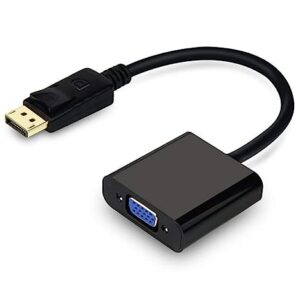
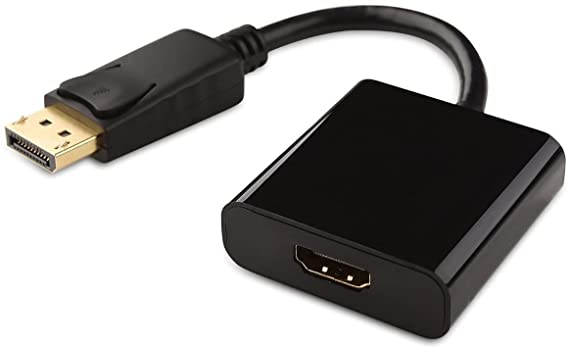
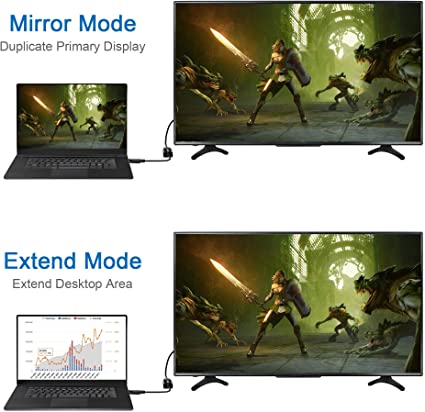
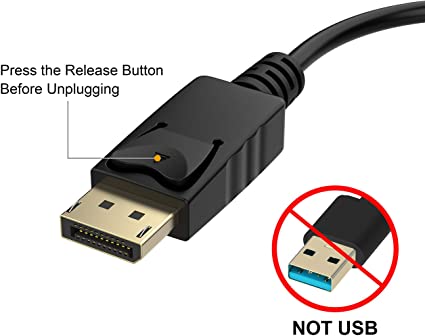
| Content | playPort to HDMI adapter is a device that allows you to connect a computer with a DisplayPort output to a display with an HDMI input. This can be useful if you have a new computer with a DisplayPort output but your old display only has an HDMI input.DisplayPort to HDMI adapters are available in both passive and active versions. Passive adapters are less expensive but they can only support lower resolutions and refresh rates. Active adapters are more expensive but they can support higher resolutions and refresh rates.To use a DisplayPort to HDMI adapter, you will need to connect the DisplayPort end of the adapter to your computer's DisplayPort output. Then, you will need to connect the HDMI end of the adapter to your display's HDMI input. Once the adapter is connected, you should be able to see the output from your computer on your display.Here are some of the benefits of using a DisplayPort to HDMI adapter:It allows you to connect a computer with a DisplayPort output to a display with an HDMI input.
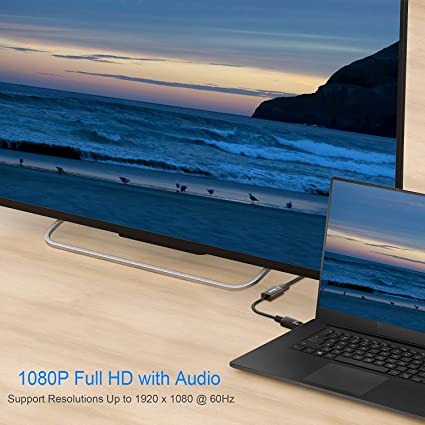
It can support resolutions up to 4K at 60Hz.
It can support high-quality audio.
It is relatively inexpensive.
Here are some of the drawbacks of using a DisplayPort to HDMI adapter:Passive adapters may not support high resolutions or refresh rates.
Active adapters can be more expensive.
The adapter may not be compatible with all displays.
Overall, a DisplayPort to HDMI adapter is a useful device that can allow you to connect a computer with a DisplayPort output to a display with an HDMI input. However, it is important to choose the right adapter for your needs and to make sure that the adapter is compatible with your display.Here are some additional things to keep in mind when using a DisplayPort to HDMI adapter:Make sure that the adapter is compatible with your computer's DisplayPort output and your display's HDMI input.
If you are using a passive adapter, make sure that the adapter supports the resolution and refresh rate that you need.
If you are using an active adapter, make sure that the adapter is powered properly.
If you are having problems with the adapter, try using a different cable. | The 4 Port USB HUB SuperSpeed 3.0 High-Speed Multiport Slim USB Hub 1 feet Cable Length Adapter and Led Indicator Compatible for Pendrive, Mouse, Keyboards, Mobile, Tablet ( Black ) 08 is a USB 3.0 hub that allows you to connect up to four USB devices to your computer. It has a sleek and slim design that makes it easy to take with you on the go, and it comes with a built-in LED indicator that shows which ports are in use. The hub is compatible with a wide range of devices, including external hard drives, printers, scanners, and more. It also supports data transfer speeds of up to 5Gbps, which means you can transfer large files quickly and easily.Here are some of the key features of the 4 Port USB HUB SuperSpeed 3.0 High-Speed Multiport Slim USB Hub 1 feet Cable Length Adapter and Led Indicator Compatible for Pendrive, Mouse, Keyboards, Mobile, Tablet ( Black ) 08:Supports up to four USB devices
Slim and portable design
Built-in LED indicator
Compatible with a wide range of devices
Data transfer speeds of up to 5Gbps
If you're looking for a high-speed USB 3.0 hub that is easy to use and compatible with a wide range of devices, the 4 Port USB HUB SuperSpeed 3.0 High-Speed Multiport Slim USB Hub 1 feet Cable Length Adapter and Led Indicator Compatible for Pendrive, Mouse, Keyboards, Mobile, Tablet ( Black ) 08 is a great option.Here are some of the benefits of using a USB 3.0 hub:You can connect more devices to your computer.
You can transfer files faster.
You can use your devices more efficiently.
You can save space on your desk.
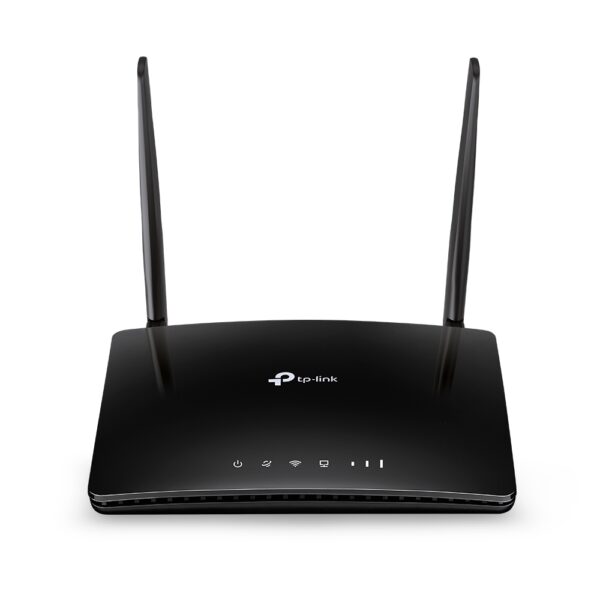
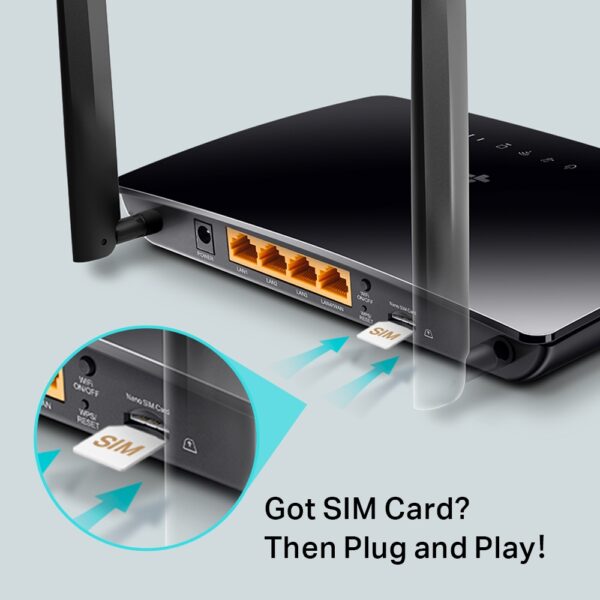
If you need to connect more devices to your computer, a USB 3.0 hub is a great solution. | The TP-Link Archer MR400 AC1200 Mbps Dual Band 4G Mobile Wi-Fi is a portable router that allows you to create a Wi-Fi hotspot wherever you go. It supports both the 2.4 GHz and 5 GHz bands, which allows you to connect to devices that only support one of these bands. It also has a SIM slot, so you can use it with a 4G LTE SIM card to get internet access anywhere there is cellular coverage.The Archer MR400 is easy to set up and use. Just insert a SIM card and turn it on, and you'll be able to connect to the internet in minutes. It also has a built-in web interface that allows you to configure its settings, such as the Wi-Fi network name and password.The Archer MR400 is a great option for anyone who needs a portable router that can provide reliable internet access. It's perfect for travelers, students, and anyone else who needs to stay connected on the go.Here are some of the key features of the TP-Link Archer MR400:Supports both the 2.4 GHz and 5 GHz bands
SIM slot for 4G LTE connectivity
Easy to set up and use
Built-in web interface for configuration
Portable and lightweight
Removable Wi-Fi antennas
Here are some of the benefits of using the TP-Link Archer MR400:Stay connected on the go: The Archer MR400 allows you to create a Wi-Fi hotspot wherever you go, so you can stay connected to the internet even when you're not at home or work.
Reliable internet access: The Archer MR400 supports both the 2.4 GHz and 5 GHz bands, which allows you to connect to devices that only support one of these bands. It also has a SIM slot, so you can use it with a 4G LTE SIM card to get internet access anywhere there is cellular coverage.
Easy to set up and use: The Archer MR400 is easy to set up and use. Just insert a SIM card and turn it on, and you'll be able to connect to the internet in minutes. It also has a built-in web interface that allows you to configure its settings, such as the Wi-Fi network name and password.
Portable and lightweight: The Archer MR400 is portable and lightweight, so you can easily take it with you wherever you go.
Removable Wi-Fi antennas: The Archer MR400 has removable Wi-Fi antennas, which allows you to adjust the signal strength and coverage.
If you're looking for a portable router that can provide reliable internet access, the TP-Link Archer MR400 is a great option. It's perfect for travelers, students, and anyone else who needs to stay connected on the go. | The AmazonBasics Mini DisplayPort (Thunderbolt) to VGA Adapter is a simple and affordable way to connect your computer to a VGA monitor or projector. The adapter is small and lightweight, making it easy to carry with you. It also supports resolutions up to 1920x1200, so you can enjoy high-quality images on your display.The AmazonBasics Mini DisplayPort (Thunderbolt) to VGA Adapter is compatible with most computers that have a Mini DisplayPort or Thunderbolt port. It is also compatible with a wide range of VGA monitors and projectors. The adapter is easy to use. Simply connect it to your computer and your VGA display, and you will be ready to start using your computer on your display.The AmazonBasics Mini DisplayPort (Thunderbolt) to VGA Adapter is a great value for the price. It is a simple and affordable way to connect your computer to a VGA monitor or projector. The adapter is small and lightweight, making it easy to carry with you. It also supports resolutions up to 1920x1200, so you can enjoy high-quality images on your display.Here are some of the features of the AmazonBasics Mini DisplayPort (Thunderbolt) to VGA Adapter:Supports resolutions up to 1920x1200
Compatible with most computers with a Mini DisplayPort or Thunderbolt port
Compatible with a wide range of VGA monitors and projectors
Small and lightweight
Easy to use
Here are some of the benefits of using the AmazonBasics Mini DisplayPort (Thunderbolt) to VGA Adapter:Affordable
Easy to use
Compatible with a wide range of devices
Supports high resolutions
Here are some of the drawbacks of the AmazonBasics Mini DisplayPort (Thunderbolt) to VGA Adapter:Not compatible with all Mini DisplayPort or Thunderbolt ports
May not support all resolutions on all devices
Overall, the AmazonBasics Mini DisplayPort (Thunderbolt) to VGA Adapter is a great value for the price. It is a simple and affordable way to connect your computer to a VGA monitor or projector. The adapter is small and lightweight, making it easy to carry with you. It also supports resolutions up to 1920x1200, so you can enjoy high-quality images on your display. | The Lapcare LPC388A Toner Cartridge is a compatible replacement for the HP 88A toner cartridge. It is designed to work with HP LaserJet printers, including the P1002, P1003, P1005, P1006, P1009, P1007, P1008, M1136, M1213nf, M1216, and M1218. The cartridge yields up to 1700 pages, and it is backed by a 1-year warranty.Here are some of the features of the Lapcare LPC388A Toner Cartridge:Compatible with HP LaserJet printers
Yields up to 1700 pages
1-year warranty
Here are some of the benefits of using the Lapcare LPC388A Toner Cartridge:Affordable
High-quality
Easy to install
Backed by a warranty
If you are looking for a compatible replacement for the HP 88A toner cartridge, the Lapcare LPC388A Toner Cartridge is a great option. It is affordable, high-quality, and easy to install. | The TP-Link Archer MR200 AC750 2.4GHz 750Mbps Dual Band 4G LTE Mobile Wi-Fi is a portable router that allows you to create a Wi-Fi hotspot wherever you go. It supports both the 2.4 GHz and 5 GHz bands, which allows you to connect to devices that only support one of these bands. It also has a SIM slot, so you can use it with a 4G LTE SIM card to get internet access anywhere there is cellular coverage.The Archer MR200 is easy to set up and use. Just insert a SIM card and turn it on, and you'll be able to connect to the internet in minutes. It also has a built-in web interface that allows you to configure its settings, such as the Wi-Fi network name and password.The Archer MR200 is a great option for anyone who needs a portable router that can provide reliable internet access. It's perfect for travelers, students, and anyone else who needs to stay connected on the go.Here are some of the key features of the TP-Link Archer MR200:Supports both the 2.4 GHz and 5 GHz bands
SIM slot for 4G LTE connectivity
Easy to set up and use
Built-in web interface for configuration
Portable and lightweight
Here are some of the benefits of using the TP-Link Archer MR200:Stay connected on the go: The Archer MR200 allows you to create a Wi-Fi hotspot wherever you go, so you can stay connected to the internet even when you're not at home or work.
Reliable internet access: The Archer MR200 supports both the 2.4 GHz and 5 GHz bands, which allows you to connect to devices that only support one of these bands. It also has a SIM slot, so you can use it with a 4G LTE SIM card to get internet access anywhere there is cellular coverage.
Easy to set up and use: The Archer MR200 is easy to set up and use. Just insert a SIM card and turn it on, and you'll be able to connect to the internet in minutes. It also has a built-in web interface that allows you to configure its settings, such as the Wi-Fi network name and password.
Portable and lightweight: The Archer MR200 is portable and lightweight, so you can easily take it with you wherever you go.
If you're looking for a portable router that can provide reliable internet access, the TP-Link Archer MR200 is a great option. It's perfect for travelers, students, and anyone else who needs to stay connected on the go. |







Reviews
There are no reviews yet.